Platform Navigation Menu
Last updated on October 12, 2026 • Approximate read time: 2 minutes
This page is available without a BlueOptima account.
The platform navigation menu is organized around five top-level areas that you switch between from the selector at the top of the menu: Performance Insights, Code Insights, Administration, Benchmark, and Talent Insights. Each area exposes its own dashboards, tools, and expandable sections. Your dashboards, reports, and metrics continue to work the same way as before; only the menu structure and the sign-in page have changed.
Not every navigation area is visible to every user. Administration and Code Insights are typically limited to specific roles. If your menu looks different from what's described here, this reflects your account's access rather than an error.
Several areas are part of the Enterprise Plan only: Executive Dashboard, Code Insights, Benchmark, Talent Insights, and the SAML Configuration and IP Whitelisting items in Administration. AI Impact, which is listed under Executive Dashboard, is also included from the 21-day trial and on Pro. See Understand Your Plan and What Each Tier Includes for what each plan includes.
The following animation shows the platform navigation menu.
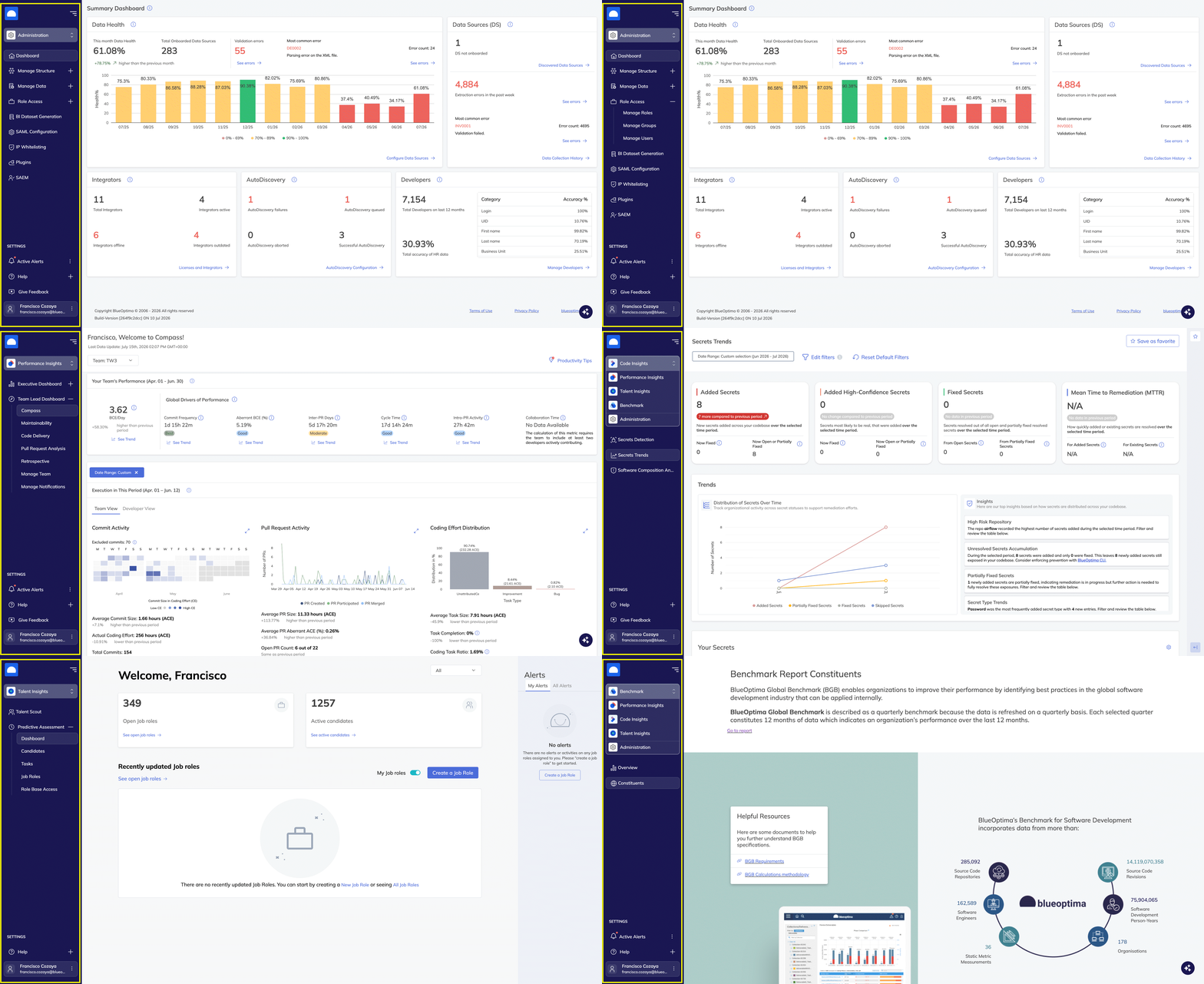
Performance Insights
Executive Dashboard
- Scorecard
- Overview
- Analyze ACE
- Maintainability report
- AI Impact
Team Lead Dashboard
- Compass
- Maintainability
- Code Delivery
- Pull Request Analysis
- Retrospective
- Manage Team
- Manage Notifications
Code Insights
- Secrets Detection
- Secrets Trends
Administration
- Dashboard
Manage Structure
- Hierarchy Mapping
- Manage developers
Manage Data
- Manage Integrations
- Licenses and Integrators
- Credential Vault
- AutoDiscovery Configuration
- Discovered Data Sources
- Configure Data Source
- Data Collection History
Role Access
- Manage Roles
- Manage Groups
- Manage Users
Administration also includes the following individual items:
- BI Dataset Generation
- SAML Configuration
- IP Whitelisting
- Plugins
- SAEM
Benchmark
- Overview
- Constituents
Talent Insights
- Talent Scout
Predictive Assessment
- Dashboard
- Candidates
- Tasks
- Job Roles
- Role Base Access
Settings Menu
The Settings section at the bottom of the navigation menu changes depending on which top-level area you're in.
| Area | Active Alerts | Help | Give Feedback |
|---|---|---|---|
| Performance Insights | Yes | Yes | Yes |
| Code Insights | No | Yes | Yes |
| Administration | Yes | Yes | Yes |
| Benchmark | Yes | Yes | No |
| Talent Insights | No | Yes | No |
The Help menu itself also varies by area:
| Area | Help Menu Items |
|---|---|
| Performance Insights | Product Tours, Replay Onboarding, API Docs, Show Milestones, Knowledge Center, Product Support |
| Administration | API Docs, Knowledge Center, Product Support |
Help menu contents for Code Insights, Benchmark, and Talent Insights will be added in a future update.
Switch Between Navigation Menus
🔒 Requires a BlueOptima account.- Select your name at the bottom of the navigation menu to open My Profile.
- Select the Summary tab.
- Use the New Navigation toggle to switch between the new and previous navigation menus.
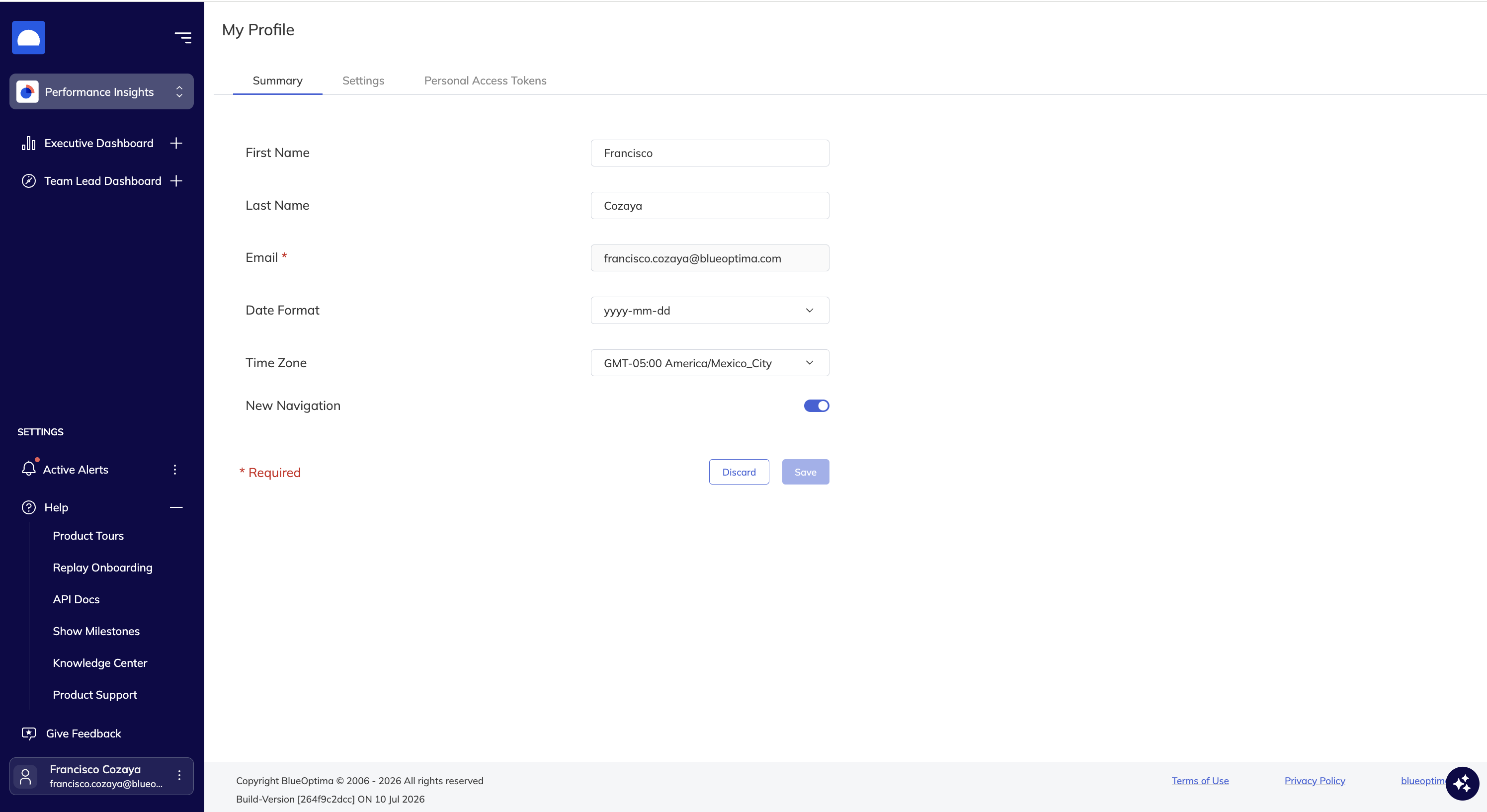
The previous navigation menu remains available through this toggle. BlueOptima plans to retire the previous navigation menu in a future release.